Monthly budget template
What comes in and what goes out in a month, planned against what actually happened.
Open in SheetsFree, with no account. What you type stays in this browser. Saves as Excel, OpenDocument or CSV.
What is in it
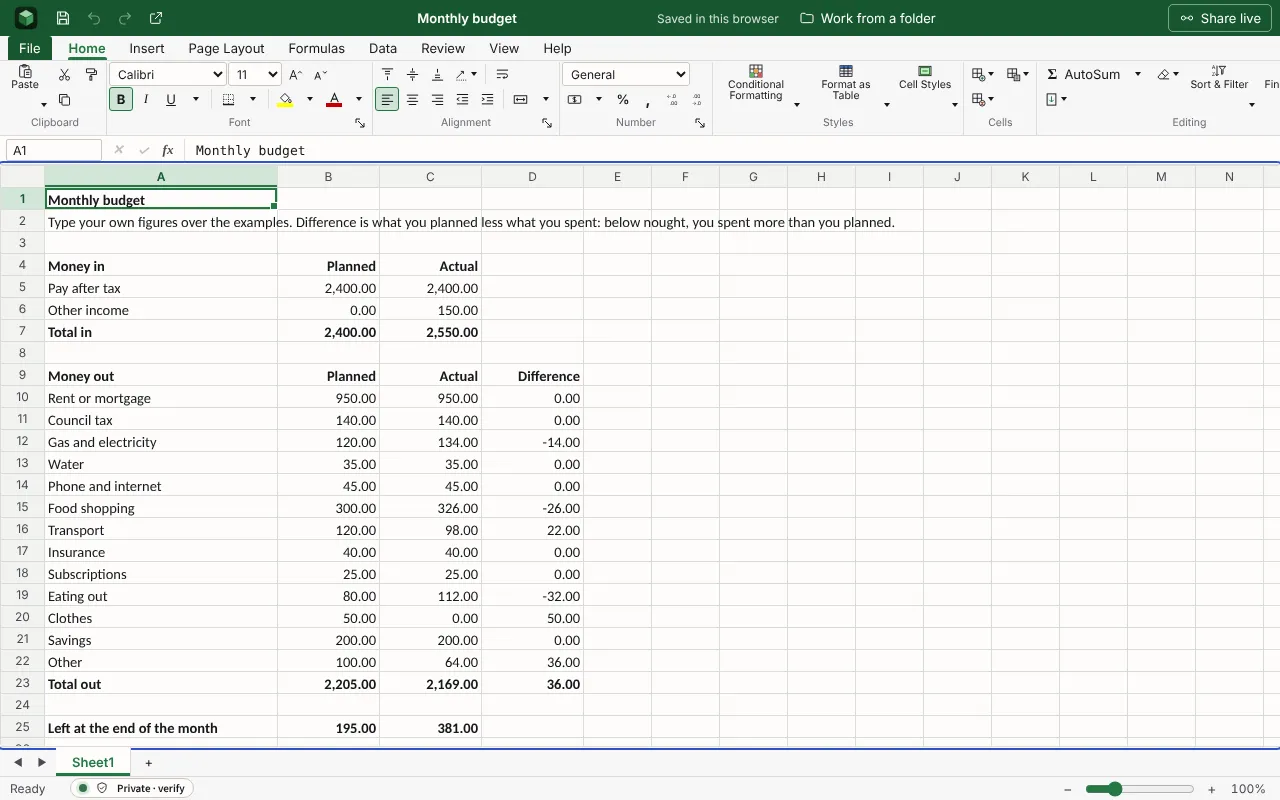
Money in and money out for a household month, planned against actual, with the difference on each line and what is left at the end. The figures are examples to type over.
| Monthly budget | |||
| Type your own figures over the examples. Difference is what you planned less what you spent: below nought, you spent more than you planned. | |||
| Money in | Planned | Actual | |
| Pay after tax | 2400 | 2400 | |
| Other income | 0 | 150 | |
| Total in | =SUM(B5:B6) | =SUM(C5:C6) | |
| Money out | Planned | Actual | Difference |
| Rent or mortgage | 950 | 950 | =B10-C10 |
| Council tax | 140 | 140 | =B11-C11 |
| Gas and electricity | 120 | 134 | =B12-C12 |
| Water | 35 | 35 | =B13-C13 |
| Phone and internet | 45 | 45 | =B14-C14 |
| Food shopping | 300 | 326 | =B15-C15 |
| Transport | 120 | 98 | =B16-C16 |
| Insurance | 40 | 40 | =B17-C17 |
| Subscriptions | 25 | 25 | =B18-C18 |
Worked out for you
These cells are formulas, so they follow whatever you type. Each is shown as written in its first row.
- Total in
=SUM(B5:B6)- Difference
=B10-C10- Total out: Planned
=SUM(B10:B22)- Total out: Actual
=SUM(C10:C22)- Total out: Difference
=SUM(D10:D22)- Left at the end of the month: Planned
=B7-B23- Left at the end of the month: Actual
=C7-C23
Filling it in
- Start from your bank statements for the last three months, not from memory. Most people underestimate food, eating out and subscriptions.
- Put savings in as a line of spending, paid on payday, so it happens before the rest of the month does.
- Look at the lines where the difference is below nought two months running. That is the plan to change, not your spending.
- Bills that come once or twice a year, such as car insurance or a TV licence, can be divided by twelve and set aside each month.
More templates
- Savings goalA target and a date, each amount put by, how much is left to save, and what that comes to each month until the date.Open in Sheets
- Operating budgetBudget against actual for each category, with the variance and the totals worked out.Open in Sheets
- Event budgetEach cost of a wedding, party or conference with its supplier, the estimate, the actual price, what has been paid and what is still to pay, against the total you set.Open in Sheets