Risk register template
Each risk with an owner, scored for likelihood and impact, rated High, Medium or Low, and a date to look again.
Open in SheetsFree, with no account. What you type stays in this browser. Saves as Excel, OpenDocument or CSV.
What is in it
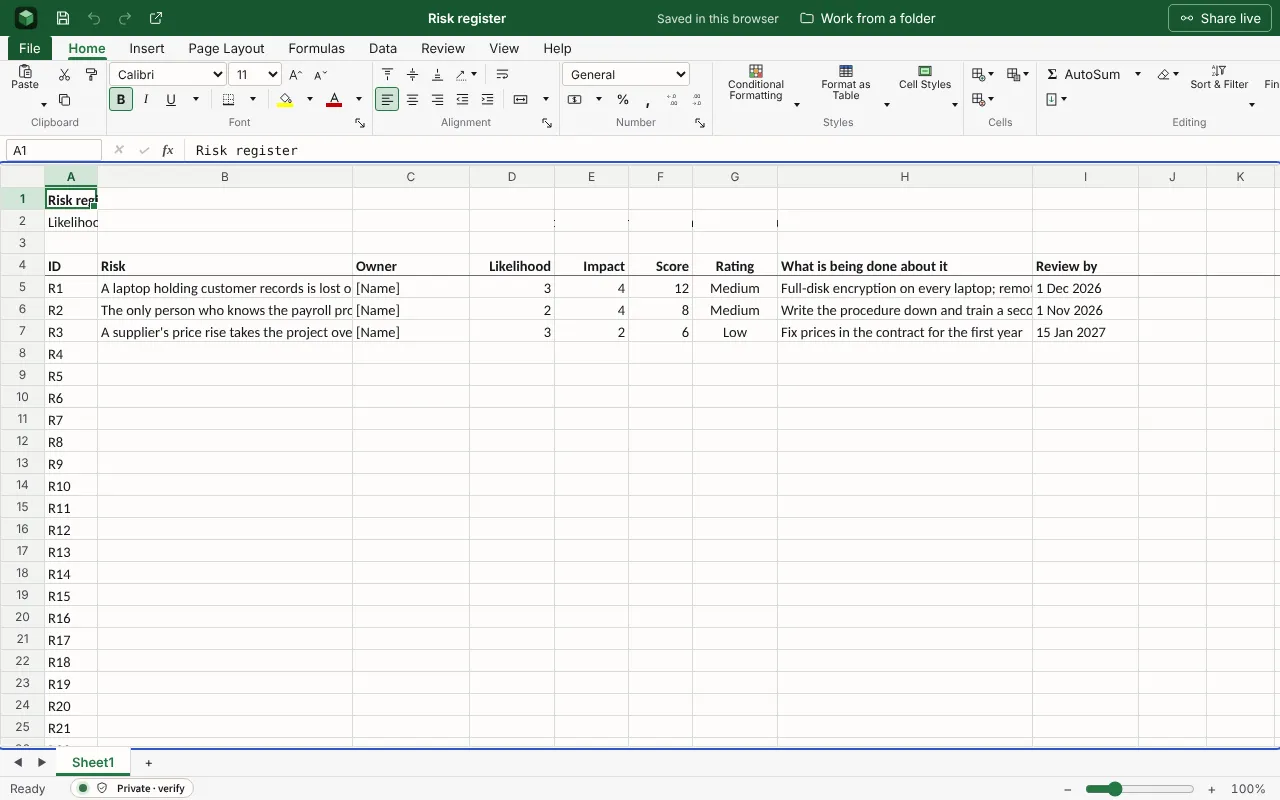
Each risk with an owner, a likelihood and impact from 1 to 5, the score and rating worked out, and the next review date. The figures are examples to type over; the workbook runs wider than the columns shown here.
| Risk register | |||||||
| Likelihood and impact are each scored 1 (lowest) to 5 (highest). Score is the two multiplied: 15 or more is High, 8 to 14 Medium, below 8 Low. | |||||||
| ID | Risk | Owner | Likelihood | Impact | Score | Rating | What is being done about it |
| R1 | A laptop holding customer records is lost or stolen | [Name] | 3 | 4 | =IF(OR(D5="",E5=""),"",D5*E5) | =IF(F5="","",IF(F5>=15,"High",IF(F5>=8,"Medium","Low"))) | Full-disk encryption on every laptop; remote wipe |
| R2 | The only person who knows the payroll process leaves | [Name] | 2 | 4 | =IF(OR(D6="",E6=""),"",D6*E6) | =IF(F6="","",IF(F6>=15,"High",IF(F6>=8,"Medium","Low"))) | Write the procedure down and train a second person |
| R3 | A supplier’s price rise takes the project over budget | [Name] | 3 | 2 | =IF(OR(D7="",E7=""),"",D7*E7) | =IF(F7="","",IF(F7>=15,"High",IF(F7>=8,"Medium","Low"))) | Fix prices in the contract for the first year |
Worked out for you
These cells are formulas, so they follow whatever you type. Each is shown as written in its first row.
- Score
=IF(OR(D5="",E5=""),"",D5*E5)- Rating
=IF(F5="","",IF(F5>=15,"High",IF(F5>=8,"Medium","Low")))
Filling it in
- Write each risk as an event with a consequence: “the only person who knows payroll leaves”, not “staffing”.
- Give every risk one named owner, not a team.
- Score it as it stands today, with the controls already in place, and look again on the review date.
- Change the High, Medium and Low thresholds in the formulas to suit how much risk your organisation will accept.
The next step
More templates
- Incident reportWritten while it is worked: the facts kept apart from the reasons, and every entry in the timeline with its source.Open in Docs
- Project status reportWhere the project stands and why, in a line, then what was done, what is next, and what you need from the reader.Open in Docs
- Subject access request logEach request with the day it arrived, the one-month deadline and the extended one, the day it was answered, and whether it is open, closed or overdue.Open in Sheets