
OBSCURA Photo Editor
Layers, camera raw and Photoshop files, in your browser.
This browser’s Pro key was not accepted: the subscription behind it has ended. Renew or subscribe below.
The Photo Editor onlyUS$35 a year, 7 days free EverythingUS$79 a year, 7 days free Sign in
7 days free, then charged unless you cancel. Refunded in full within 14 days.
- Layers, masks and adjustments
- Retouching and content-aware fill
- Camera raw with lens profiles
- PSD and PSB in and out
- A library with smart collections
- Colour managed for print
The editor at work
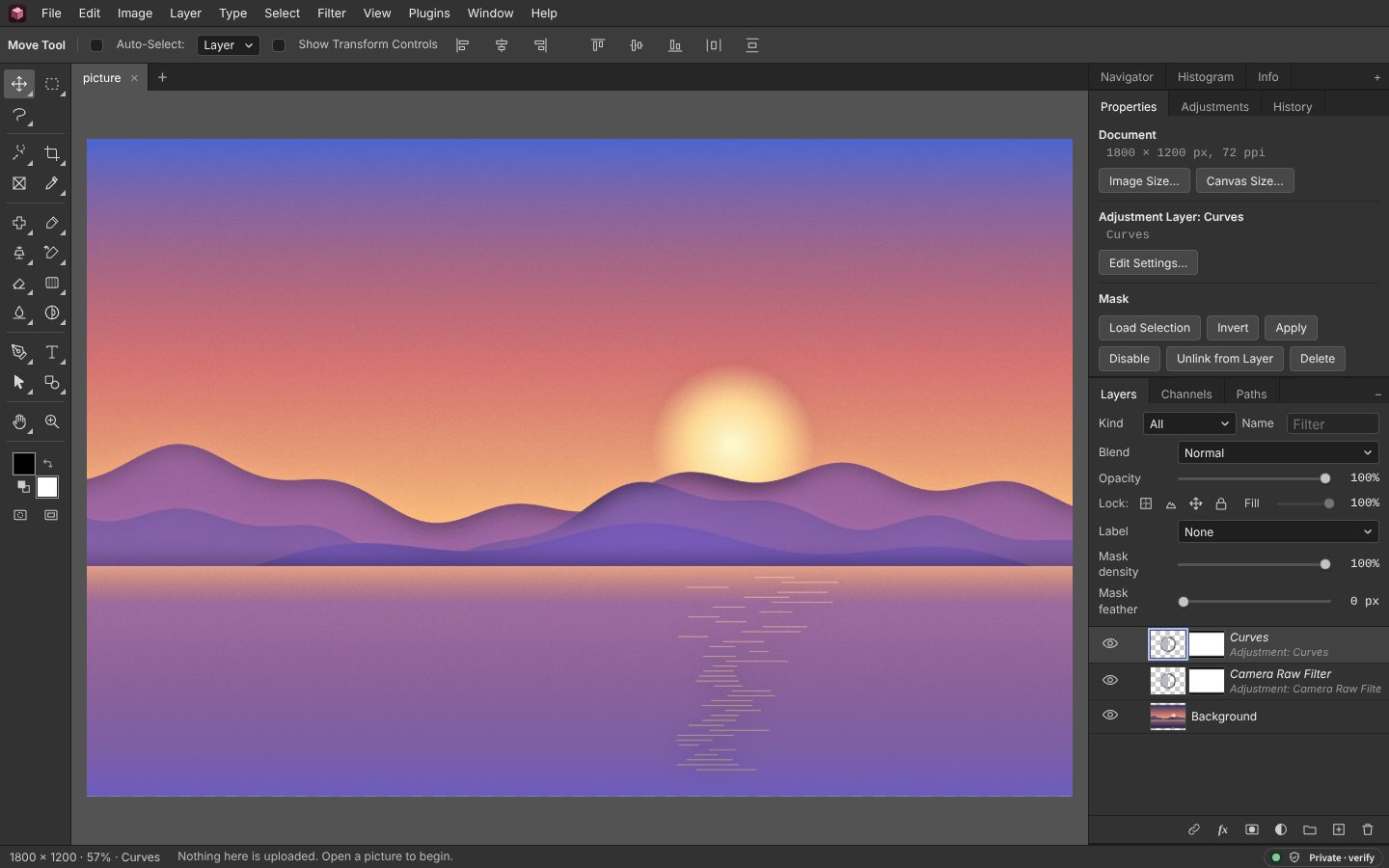
Taken from the editor itself. It has one dark window whatever the site’s theme, as most photo editors do, so the colours of a picture are judged against grey. The picture is an illustration drawn for these screenshots. The menus are laid out the way people who have used Photoshop expect, with the keyboard shortcuts they already know.
Everything it does
A layered photo editor for the work people usually pay a monthly subscription for. Your pictures stay on your own computer. Layers and masks, retouching, camera raw, Photoshop files in and out, and colour for print.
Before you start: Every layer is 8 bits a channel: a 16-bit PSD or raw file opens, and is edited at 8 bits. What else it does not do
Compared with Photoshop and Photopea.
In brief
- Layers, masks and adjustment layers Blend modes, groups, clipping, layer styles, smart objects with smart filters, and artboards
- Retouching Clone, healing, spot healing and patch on their own empty layer, sampling the layers below, content-aware move and fill, liquify, warp and perspective
- Selections Quick selection, magnetic lasso, colour range and Select and Mask, and Select Subject and Remove Background by a small model that runs in the tab
- Camera raw CR3, NEF, ARW, RAF, DNG and 22 more raw formats, decoded in the tab at sixteen bits a channel and developed with a raw converter’s sliders, colour mixer, colour grading, curves and local masks
- Photoshop PSD and PSB in and out Layers, groups, masks, clipping, guides, the common adjustment layers, and text, shapes and layer styles that stay editable, read from 8 or 16-bit files in RGB, greyscale or CMYK and written back; Photoshop’s brushes, patterns, gradients, styles and actions imported
- A library A folder of photos with ratings, colour labels, keywords and each photo’s develop settings kept in XMP sidecars that Lightroom, Bridge and exiftool read, settings copied and synced across many, and contact sheets and print layouts as PDF
- Colour management Embedded ICC profiles read, a working space of sRGB, Display P3, Adobe RGB or ProPhoto RGB, proofing on screen with a gamut warning, and 16-bit TIFF, PNG and PSD or CMYK TIFF with the profile embedded
- Kept on this device Autosaved as you work and offered back after a crash; it works offline once opened
Layers
Layers, masks and layer styles
Every layer stays what it is until you flatten it: pixels, text, a shape, a fill or an adjustment, with its own mask, blend mode and styles. Styles are drawn from the layer’s edge each time the picture is composited, so they follow the layer when it moves or is repainted.

- Layerspixel · text · shape · fill · adjustment · smart object · group · artboard
- Maskslayer mask · clipping · linked or unlinked from the layer · Blend If
- Layer styles10 effects · up to 10 shadows, overlays and strokes each · a blend mode per effect
- Light and contourglobal light angle and altitude · 9 contours · bevel texture · glow spread and choke
- Smart objectskeep their source · smart filters stay editable · saved back into the source
- Mask All Objectseach separate thing Select Subject finds, in its own masked group
- Photoshop presets.asl styles · .pat patterns · .grd gradients · .abr brushes · .csh shapes · .aco and .ase swatches
- Text and shapeseditable type · rectangle · ellipse · polygon · star · line · pen and Paths panel
Tone and colour
Curves, levels and colour
Adjustments go on the pixels or as a layer above them, shown live on the picture. Curves and Levels take their black, grey and white points from the picture itself, and show which pixels are clipped while you drag.

- Curvesper channel · 10 presets · black, grey and white eyedroppers · drag on the picture · clipping · Auto
- Levelsinput and output · eyedroppers · clipping · Auto
- Adjustmentsbrightness and contrast · hue and saturation · colour balance · exposure · vibrance · black and white · channel mixer · selective colour · gradient map · photo filter · shadows and highlights · match and replace colour
- Looksready-made looks · 3D LUTs read from and saved as .cube files
- Colour managementICC profiles read and embedded · sRGB · Display P3 · Adobe RGB · ProPhoto RGB · Little CMS
- Proofingproof colours in sRGB or for a printer · gamut warning · CMYK TIFF
- Sixteen bitsImage > Mode > 16 Bits/Channel · raw, 16-bit TIFF, PNG and layered PSD open in it · layers, adjustments, painting and transforms at sixteen bits
Camera raw
Camera raw formats it opens
LibRaw, compiled to WebAssembly, decodes the file in the tab, and the picture is developed at sixteen bits a channel into the working colour space. The Develop panel is an adjustment layer that stays editable, with masks that give part of the picture its own settings.

- DecodingLibRaw in WebAssembly · black level · white balance · demosaic · the camera’s colour matrix
- Developexposure · contrast · highlights · shadows · whites · blacks · clarity · dehaze · vibrance · saturation · temperature · tint
- Detailsharpening with radius, detail and masking · luminance and colour noise reduction
- Colourcolour mixer · colour grading · a curve per channel
- Lens and Transformlensfun profiles · Upright Auto, Level, Vertical, Full and Guided · perspective, rotation, aspect and scale
- Effectsa vignette after the crop, in highlight priority, colour priority or paint overlay · grain
- The whole windowF gives Develop the window: the picture large, its histogram and every section
- Local adjustmentslinear gradient · radial gradient · brush · the subject · the sky · luminance and colour ranges
- Presetsyour own, by name · Lightroom presets imported
- Librarystars · picks and rejects · colour labels · keywords · collections · XMP sidecars · copy, paste and sync settings · a filmstrip under the picture · contact sheets as PDF
27 raw formats, by the maker whose cameras write them. The editor hands the file to LibRaw; if LibRaw cannot decode a particular camera’s file, the editor says it could not develop it, with LibRaw’s reason, and opens nothing.
| Maker | Extensions |
|---|---|
| Canon | CR3, CR2, CRW |
| Nikon | NEF, NRW |
| Sony | ARW, SRF, SR2 |
| Fujifilm | RAF |
| OM System and Olympus | ORF |
| Panasonic | RW2, RAW |
| Leica | RWL, DNG |
| Pentax | PEF |
| Samsung | SRW |
| Sigma | X3F |
| Hasselblad | 3FR, FFF |
| Phase One and Leaf | IIQ, MOS |
| Mamiya | MEF |
| Kodak | KDC, DCR |
| Minolta | MRW |
| Epson | ERF |
| GoPro | GPR |
| Any camera that writes Adobe’s format, and phones in raw mode | DNG |
Retouching
Retouching, selections and perspective
Retouching can go on an empty layer above the photo, sampling the layers below, so the photo itself is never touched. Vanishing Point does the same along a surface seen at an angle: a floor, a wall, the side of a building.

- Retouchingclone stamp · healing brush · spot healing · patch · content-aware move · Remove · red eye · frequency separation
- Vanishing Pointa plane from four corners · clone in perspective · paste onto it · on its own layer
- Selectionsmarquees · lassos · magnetic lasso · magic wand · quick selection · colour range by colour, family, tone or skin · luminosity masks · focus area · Select and Mask
- Select SubjectU²-Net, 4.6 MB, fetched once from this site and run in the tab · Remove Background
- SkySelect Sky by rule · Sky Replacement on masked layers
- HistoryHistory panel · snapshots · history brush
Transform
Transform and warp
Pin a layer where it should stay and drag the rest: Puppet Warp bends a layer round its pins over a mesh, keeping its parts as rigid or as loose as you ask.

- Transformscale · rotate · skew · distort · perspective
- Puppet Warppins · rigid or normal · fewer, normal or more points · the mesh shown or hidden
- Warp and Liquifywarp mesh · push · twirl · pinch · swell
- Content-aware scaleremoves the least noticeable seams first
- Perspective cropsquares up a photographed page
Filters
Filters, one at a time or stacked
Filters run with a live preview, on the pixels or as smart filters on a smart object. In the Filter Gallery, effects are stacked as effect layers and seen together before they are applied.

- Filter Galleryall 47 effects · stacked effect layers · preview at 100% or of the whole layer
- FiltersBlur · Blur Gallery · Distort · Noise · Pixelate · Render · Sharpen · Stylize
- Lens Blurdepth from the subject: the subject sharp, the rest receding
- Large picturesthe slowest 13 run in background workers · a count while they run · Cancel
- Pluginswritten in JavaScript · sealed off from the network
Files
Files in and out
Export As shows the size the file will come to and the picture before and after the encoder, side by side. The location and camera data are left out unless you keep them.

Opens
- JPEG
- PNG
- WebP
- GIF
- BMP
- AVIF
- HEIC
- HEIF
- TIFF
- SVG
- PSD
- PSB
- AI
- JXL
- ORA
- KRA
- XCF
- TGA
- ICO
- CUR
- PPM
- PGM
- PBM
- PAM
- HDR
- EXR
- OBPHOTO
- 27 raw formats
Saves
- PSD
- PSB
- ORA
- OBPHOTO
- JPEG
- PNG
- PNG-8
- WebP
- AVIF
- GIF
- TIFF
- TIFF CMYK
- BMP
- TGA
- ICO
- PPM
- PAM
- HDR
- EXR
- JXL
- SVG
- APNG
At sixteen bits
- PNG 16
- TIFF 16
- PSD 16
- PalettesGIF and PNG-8 · 8 to 256 colours · dithering · exact when the picture has that few
- High dynamic rangeRadiance HDR · OpenEXR, scanline or tiled, half or float, ZIP, RLE or PIZ · opened at 16 bits
- IconsICO with seven sizes, 16 to 256 px
- Project file.obphoto keeps everything, text and smart objects included
- Exportlayers and artboards to files · SVG · PDF · animated GIF and PNG · lookup tables as .cube
- Outputsharpened for screen, glossy or matte paper · converted to sRGB, Display P3 or Adobe RGB · a long side to fit · presets
- AVIFwhere the browser encodes it
What survives a trip through Photoshop
A PSD or PSB is read and written here from the published format, byte by byte. Text, shapes and layer styles are kept as Photoshop keeps them, as descriptors, which ag-psd, an open-source library this site serves from its own address, reads and writes. The pixels in the file and the flattened picture at its end are this editor’s own rendering, so a program that does not draw text and effects itself shows what was on screen; Photoshop sets the words again with its own fonts when they are edited, so the text can move a little if a font differs.
| In the file | Read | Written |
|---|---|---|
| Pixel layers with position, opacity, visibility and blend mode | Yes | Yes |
| Layer masks and clipping | Yes | Yes |
| Groups, nested, open or folded, with their opacity and blend | Yes | Yes |
| Guides | Yes | Yes |
| Levels, curves, brightness and contrast, hue and saturation, colour balance, exposure, invert, threshold and posterise adjustment layers | Yes | Yes |
| Text layers: the words, font, size, colour, weight, tracking, leading, alignment, rotation, vertical type and the warps both have | As editable text | As editable type |
| Shape layers: the outline, fill and stroke | As editable shapes | As vector shapes |
| Vector masks on pixel layers | As a pixel mask | No |
| Layer styles: drop and inner shadow, outer and inner glow, colour overlay and stroke, with their blend modes, and several shadows, colour overlays and strokes on one layer | Yes | Yes |
| Bevel and emboss, satin, gradient and pattern overlays | Left out, and it says which | Drawn into the layer’s pixels, and it says so |
| Colour modes | RGB, greyscale, indexed, duotone and CMYK, 8 or 16 bit | 8-bit RGB with its layers, or flat 16-bit RGB |
| Large Document Format (PSB), within this editor’s size ceiling (below) | Yes | Yes |
| 32-bit, Lab and multichannel files | Refused, with the reason | No |
Automation
Actions, batches and droplets
Record the menu steps you take, with the numbers from their dialogs, and play them on this picture or a folder of files. A droplet keeps an action with a format and a size: drop pictures on it in the Actions panel and each is opened, played, saved and closed.

- Actionsmenu steps with their numbers · play on a picture or a folder
- Dropletsan action · a format · a longest side · into a folder or one zip
- Photoshop actions.atn · 57 kinds of step read · the rest named and left out
- Several pictures into onePhotomerge in perspective or on a cylinder · Merge to HDR Pro · exposure fusion · focus stacking
- Animationframe timeline · tweening · one frame per layer · animated GIF and PNG
On this device
Your files stay on your computer
The editor is a page that does its work in the tab. A picture is opened from your disk, edited in your browser’s memory and saved back to your disk; it is never uploaded, and the editor makes no requests to other sites.

- No serverthe picture is sent nowhere · no account · no adverts or trackers
- Fetched once from this sitethe subject model · LibRaw · the PDF and JPEG XL readers · then kept for offline use
- Autosavethe browser’s own storage · offered back after a crash · with Your folder connected, the last ten versions there
- Kept in this browserimported presets · droplets · actions · the library’s picks and collections
- Exportlocation and camera data left out unless you keep them
- Offlineworks without a connection once opened
What it cannot do yet
- Some tools stay at eight bits. In a 16-bit picture the clone, healing, smudge, dodge, burn and mixer tools, Liquify, Puppet Warp, Warp, layer styles, smart objects and most filters are greyed out until Image > Mode > 8 Bits/Channel; masks and selections are eight bits. The screen shows the sixteen bits dithered to eight. CMYK is for proofing and TIFF export, not a mode to edit in.
- Large pictures have a ceiling, set by the device. A computer with 8 GB holds a picture of up to 150 megapixels at its full size (a 61- or 100-megapixel photo opens as it is); 4 GB holds 60. An iPhone or iPad holds 16.7, the largest canvas Safari draws there, and an Android phone 12 to 40 by its memory. A larger picture, raw file, PSD, TIFF or project opens scaled down to fit, and the status line says its own size, the size it opened at and why; the file is not changed. A PDF page is drawn at a lower resolution to stay under it. Each layer is held whole in memory, so a picture near the ceiling with many layers can still use more than the device has. The graphics card, through WebGL2, does the blend modes the browser’s canvas lacks, hue and saturation, the adjustments that mix colours, and the Gaussian blur, each held to the editor’s own answer within a level or two and used only where it is the quicker on your computer. In our tests on a 6-megapixel picture, with WebGL drawn in software rather than on a graphics card, the ten extra blend modes ran between 1.7 and 2.9 times as fast as in JavaScript over several runs, hue and saturation between about as fast and twice as fast, and the blur slower, so there the blur stays in JavaScript; on a real graphics card we have not measured it. The rest is the canvas and JavaScript, so a very large picture with many layers is still slower than in a desktop program.
- Select Sky is found by rule, not learnt. A sky the same colour as what meets it, such as white sky over snow, runs on into it, and a distant hazy hill touching a small part of the sky can be taken with it; check the edge with Select and Mask.
- No pictures fetched from other sites. A picture dragged from another OBSCURA tab opens; one dragged from another website has to be saved first, or copied and pasted, since the editor makes no requests to other sites.
- The library needs Chrome or Edge on a computer for a folder. Firefox and Safari have no File System Access API, so there you choose files instead, and their sidecars are downloaded as a zip to put beside them. The library reads a folder each time it is opened; it is not a catalogue of a hundred thousand photos. Virtual copies are kept in the photo's sidecar, so they go where it goes; picks, collections and smart collections have no place in a sidecar, so they are kept in this browser for each folder, and another browser does not see them.
- Develop settings in Lightroom. The settings are written under Camera Raw’s names, so Lightroom and Camera Raw read the sliders, the mixer, grading and the curves; the arithmetic behind each slider is each program’s own, so the picture is similar, not identical. A white balance Lightroom wrote in kelvin is measured from the raw file’s own as-shot reading through its colour matrix, which can differ a little from Lightroom’s, whose camera profiles are Adobe’s own; on a picture that is not a raw file it is left out, and the report says so. The masks are kept where only this editor reads them; a subject or sky mask is kept by its kind and found again on the photo when it is opened from the library.
- Lens profiles are lensfun’s, not Adobe’s. Develop’s Lens section corrects distortion, colour fringes and vignetting from the lensfun database (CC BY-SA 3.0), about 1,500 lenses measured by its contributors and served from this site. A lens it does not have is corrected by hand in Lens Correction, and a fisheye is not corrected.
- Sidecars and JPEGs. Lightroom Classic reads a sidecar for a raw file; for a JPEG it reads the XMP inside the file, which the library reads but does not write. Bridge, darktable, digiKam and exiftool read the sidecars; the library writes photo.xmp, as Adobe’s programs name them, or photo.jpg.xmp for darktable and digiKam.
- The Filter Gallery’s effects are models. All forty-seven of Photoshop’s are here, but Adobe does not publish how they work: each is a model that does the same job, so the result is like Photoshop’s, not the same.
- Photoshop actions in part. An .atn file brings in the steps this editor has a counterpart for, fifty-seven kinds of them, such as Levels and Curves channel by channel, Colour Balance, Gaussian Blur, Motion Blur, Unsharp Mask, Hue/Saturation, Image Size and Canvas Size, to a size or by so much, anchored where it was; the rest, such as a selection made by hand, are named when it is imported and left out.
- Puppet Warp pins cannot be turned or stacked. A pin moves; it cannot be rotated by hand or brought in front of another part of the mesh, as Photoshop’s can.
- Vanishing Point has one plane. Clone along it and paste onto it; planes joined round a corner, such as two walls of a building, are done one at a time.
- Lens Blur’s depth is not measured. It is made from the subject: the subject kept near and sharp, the rest receding up the picture. There is no model here that estimates depth from one photo.
- Photomerge does not correct the lens. Frames are matched by their corners and laid in perspective or on a cylinder, with the exposure evened out, but a lens’s barrel distortion is not taken out first, so with a wide lens the seams can show; correct each frame in Lens Correction before merging. A person who moved between frames can appear twice near a seam.
- Develop fills the window, but is not a module. F gives Develop the whole window, with the picture, its histogram and every section, but it is still one adjustment on the picture, with the editor’s own history; a shoot is gone through with the filmstrip under the picture, not in a module of its own as in Lightroom.
- PDF and Illustrator files are opened as a picture. A page is drawn at the resolution you choose, up to 40 megapixels, onto one layer; its text and paths are not kept as text and shapes. An Illustrator file saved without PDF compatibility is refused, with the reason.
- Text in a PSD. Mixed styles within one text layer come in as the first style; a warp the editor does not have is left off; gradient strokes are drawn into the pixels.
- No Photoshop .8bf plugins. They are compiled Windows and Mac programs that no browser can run; plugins here are written in JavaScript.
- Nothing generated from a prompt. Nothing here sends your picture to a model on a server; the one model it uses finds the subject and runs in the tab.
Compared with what you may use now
Against Photoshop, every tool and panel and what is missing; against Photopea, which also runs in the browser and is free with adverts. If you have a photo from an iPhone, how to open a HEIC file.
No picture is open.
Draw with the pointer; the keyboard shortcuts are listed in the menus.
Recent, kept on this device
Kept by the browser a few seconds after each change; nothing is sent anywhere. Closing a picture on purpose forgets its copy.
Start from a size
Templates
Each is an ordinary picture with its layers: frames to place your own photos into (File > Place Embedded with a frame picked), and text that stays editable.
Layers
Ctrl-click picks more than one layer, Shift-click a run of them. Drag a row to reorder it, or onto a group to put it inside.
Color
Swatches
Brushes
Paths
Histogram
Info
- Pointer
- outside
- Colour
- HSB
- Selection
- none
- Picture
- No picture
Channels
Click Red, Green or Blue to look at that channel on its own; RGB shows the picture again. Double-click a saved channel to rename it.
Actions
Menu steps are recorded with their numbers: adjustments, filters, sizes, transforms, exports. Brush strokes and drags are not. Actions stay on this device.
Droplets
Properties
Adjustments
Add an adjustment layer: it changes everything below it and can be changed again.
Character
OpenType
Paragraph
Layer Comps
A comp remembers which layers show, where each one is and its layer style. Click one to apply it.
Styles
Click a style to give it to the picked layers; Shift-click adds it to the style they have.
Gradients
Patterns
Shapes
Click a shape to draw it with the Custom Shape tool.