Mileage log template
Each business journey with its date, route and purpose, and what the miles come to at your rate.
Open in SheetsFree, with no account. What you type stays in this browser. Saves as Excel, OpenDocument or CSV.
What is in it
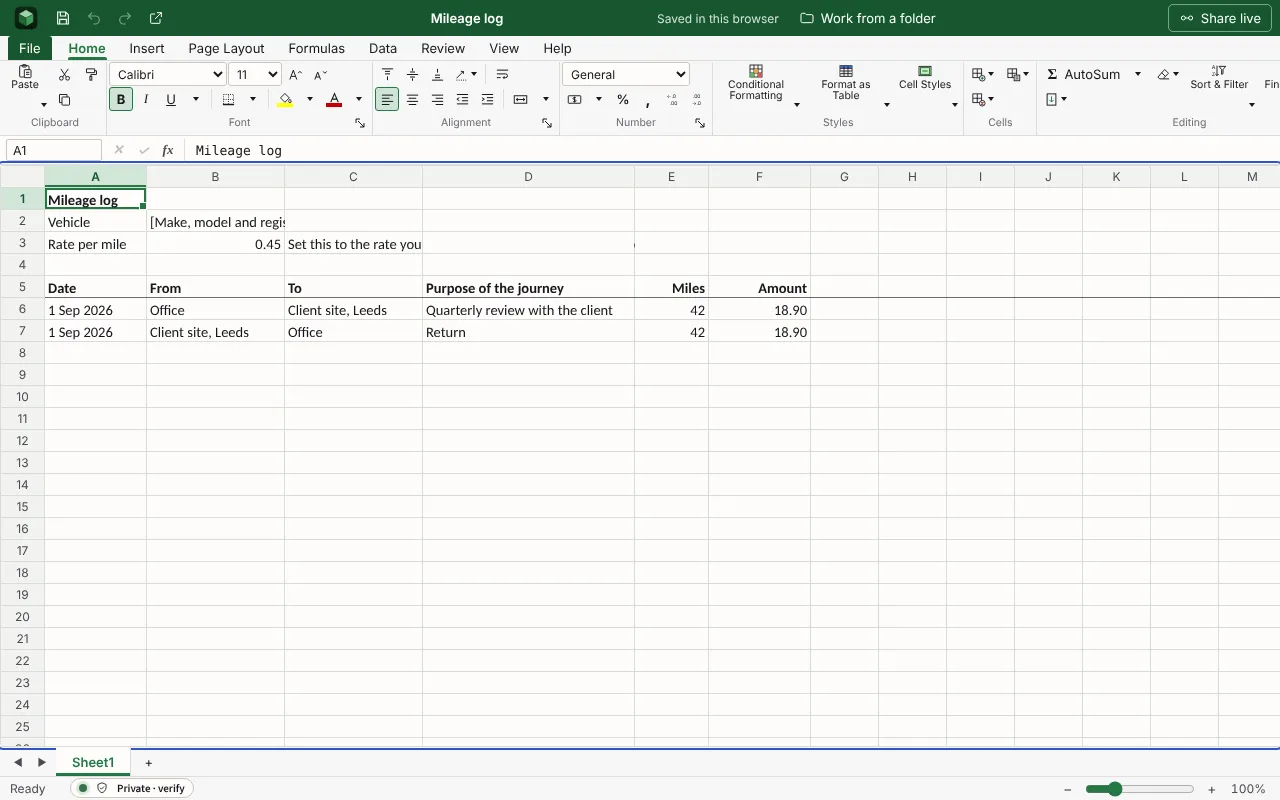
Each business journey with its date, route, purpose and miles, and what it comes to at your rate per mile. The figures are examples to type over.
| Mileage log | |||||
| Vehicle | [Make, model and registration] | ||||
| Rate per mile | 0.45 | Set this to the rate you claim at, and check it is the current one. | |||
| Date | From | To | Purpose of the journey | Miles | Amount |
| 2026-09-01 | Office | Client site, Leeds | Quarterly review with the client | 42 | =IF(E6="","",E6*$B$3) |
| 2026-09-01 | Client site, Leeds | Office | Return | 42 | =IF(E7="","",E7*$B$3) |
=IF(E8="","",E8*$B$3) | |||||
=IF(E9="","",E9*$B$3) | |||||
=IF(E10="","",E10*$B$3) | |||||
=IF(E11="","",E11*$B$3) | |||||
=IF(E12="","",E12*$B$3) | |||||
=IF(E13="","",E13*$B$3) | |||||
=IF(E14="","",E14*$B$3) | |||||
=IF(E15="","",E15*$B$3) | |||||
=IF(E16="","",E16*$B$3) | |||||
=IF(E17="","",E17*$B$3) | |||||
=IF(E18="","",E18*$B$3) |
Worked out for you
These cells are formulas, so they follow whatever you type. Each is shown as written in its first row.
- Amount
=IF(E6="","",E6*$B$3)- Total: Miles
=SUM(E6:E25)- Total: Amount
=SUM(F6:F25)
Filling it in
- Write the purpose of every journey. HMRC asks for it, and “meeting” is not enough: say with whom and why.
- HMRC’s approved rate for a car has long been 45p a mile for the first 10,000 business miles in a tax year and 25p after that. Check the current figure before you claim.
- Ordinary commuting between home and a permanent workplace is not business mileage.
- Fill it in on the day. Logs reconstructed at the end of the year are the ones that are questioned.
The next step
More templates
- Operating budgetBudget against actual for each category, with the variance and the totals worked out.Open in Sheets
- Invoice trackerInvoices, clients, amounts and whether each is paid, with the total invoiced.Open in Sheets
- Monthly budgetMoney in and money out for a household month, planned against actual, with the difference on each line and what is left at the end.Open in Sheets