Open a PDF
Drop a PDF here, or pictures to make one, or choose a file. It is read in this tab and stays on this computer.

Edit, redact, sign and check PDFs.
This browser’s Pro key was not accepted: the subscription behind it has ended. Renew or subscribe below.
PDF Studio onlyUS$2 a month, 7 days free EverythingUS$5 a month, 7 days free Sign in
US$2 a month or US$19 a year for PDF Studio, or US$5 a month or US$48 a year for everything. 7 days free. Stripe takes a card, and nothing is charged if you cancel before they end.
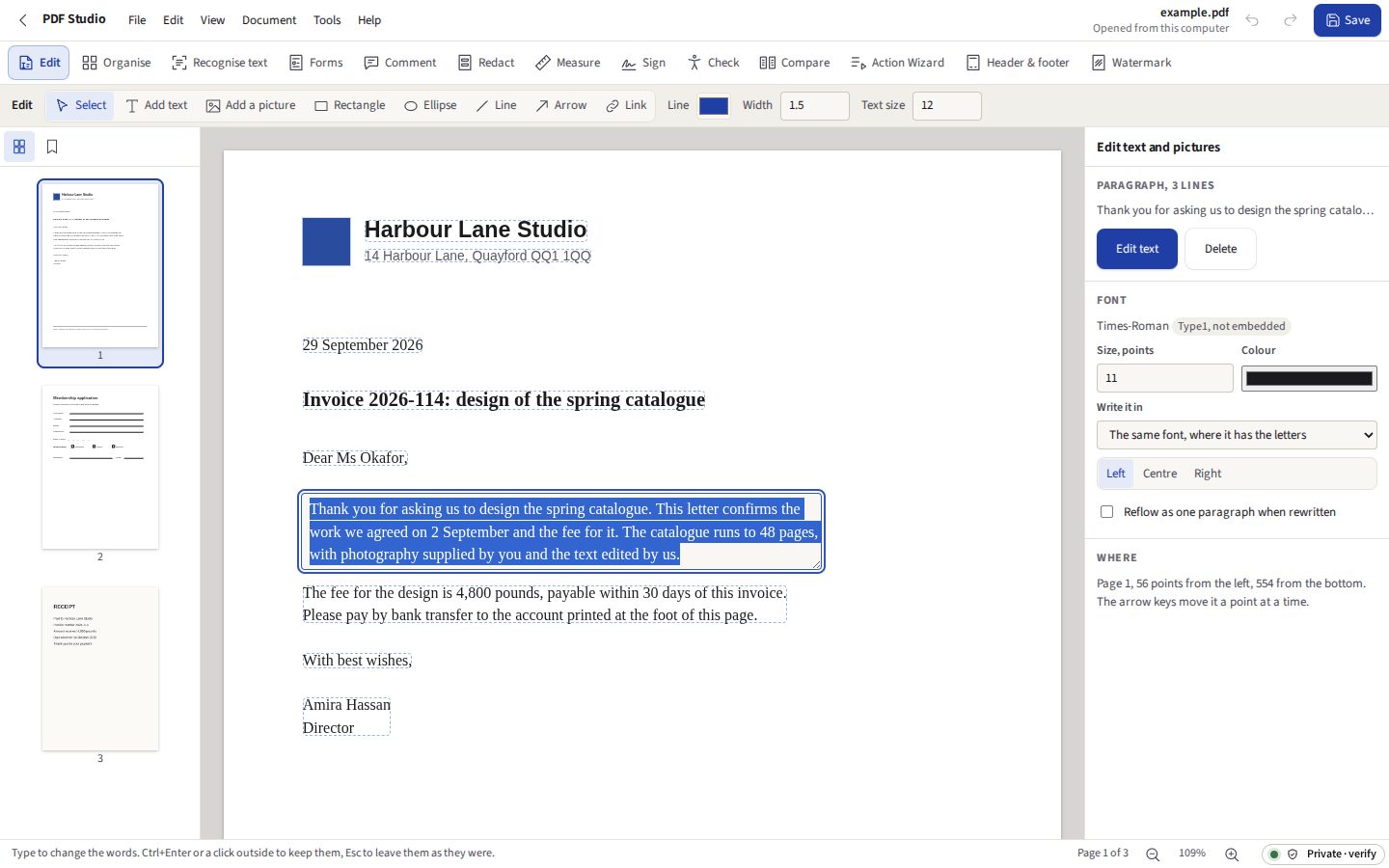
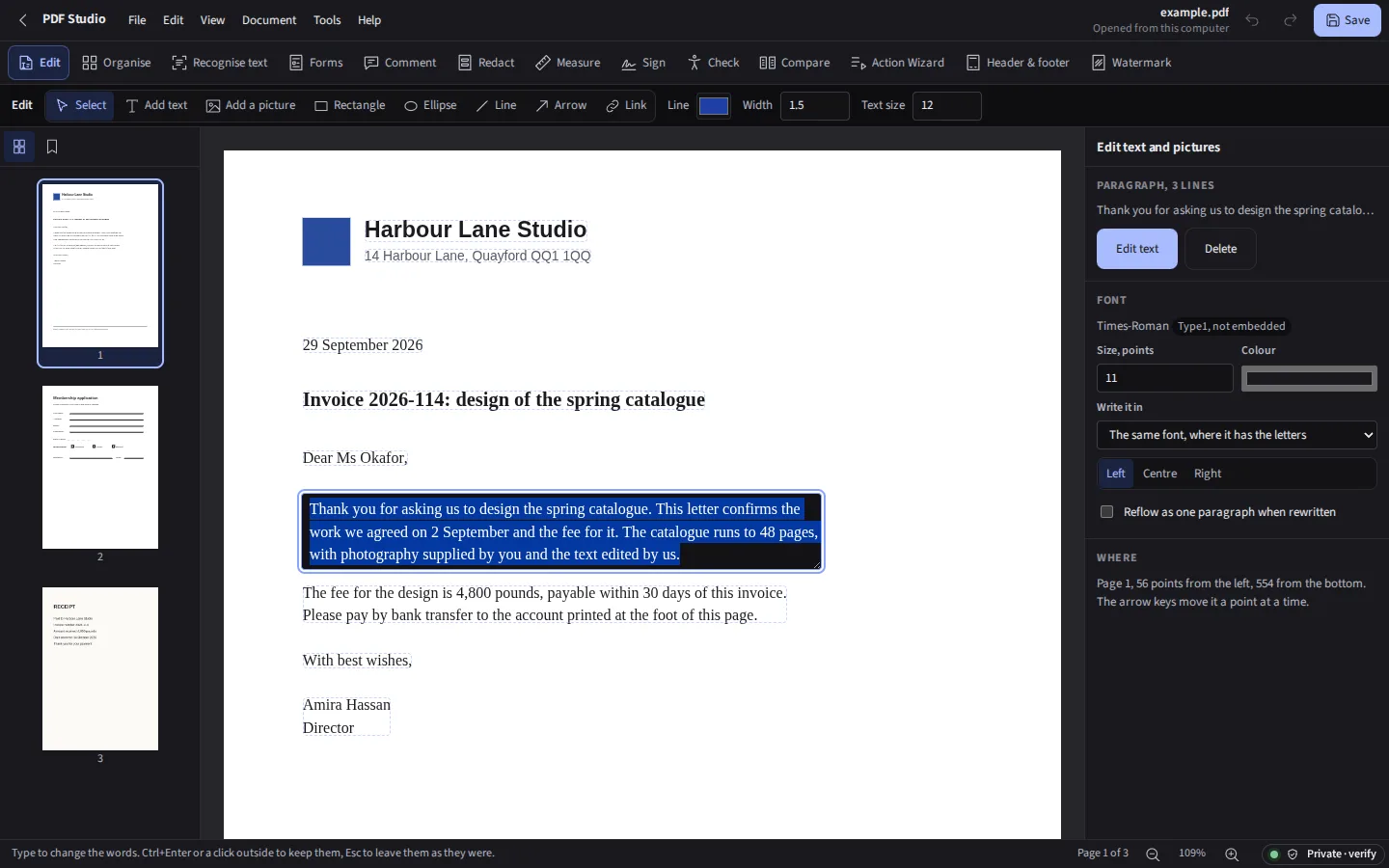
Taken from PDF Studio itself, with its own example document. The free PDF editor in the Workspace still fills, signs, marks up and reorders a PDF for anybody, with no account; PDF Studio is the part that changes what is already printed.
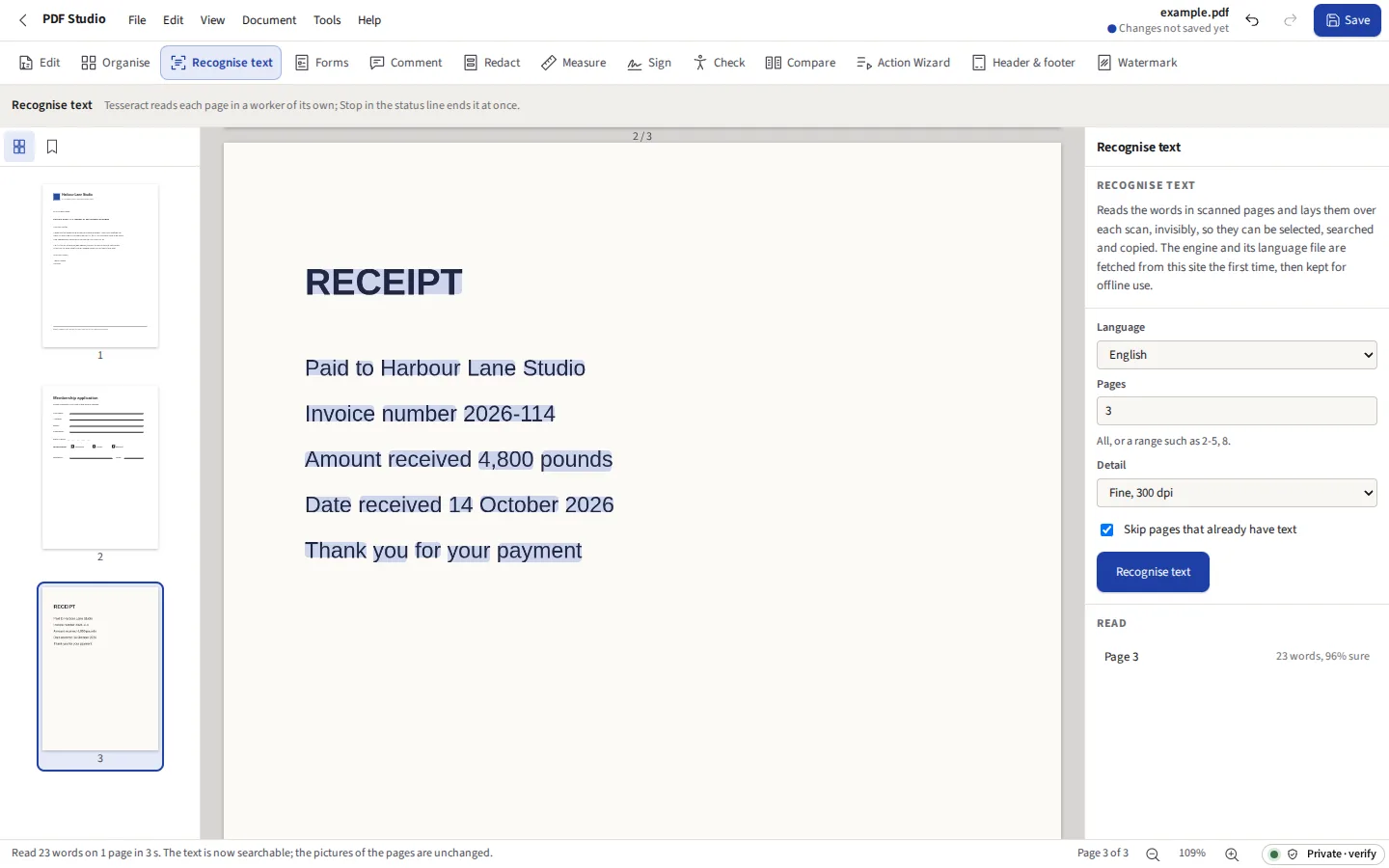

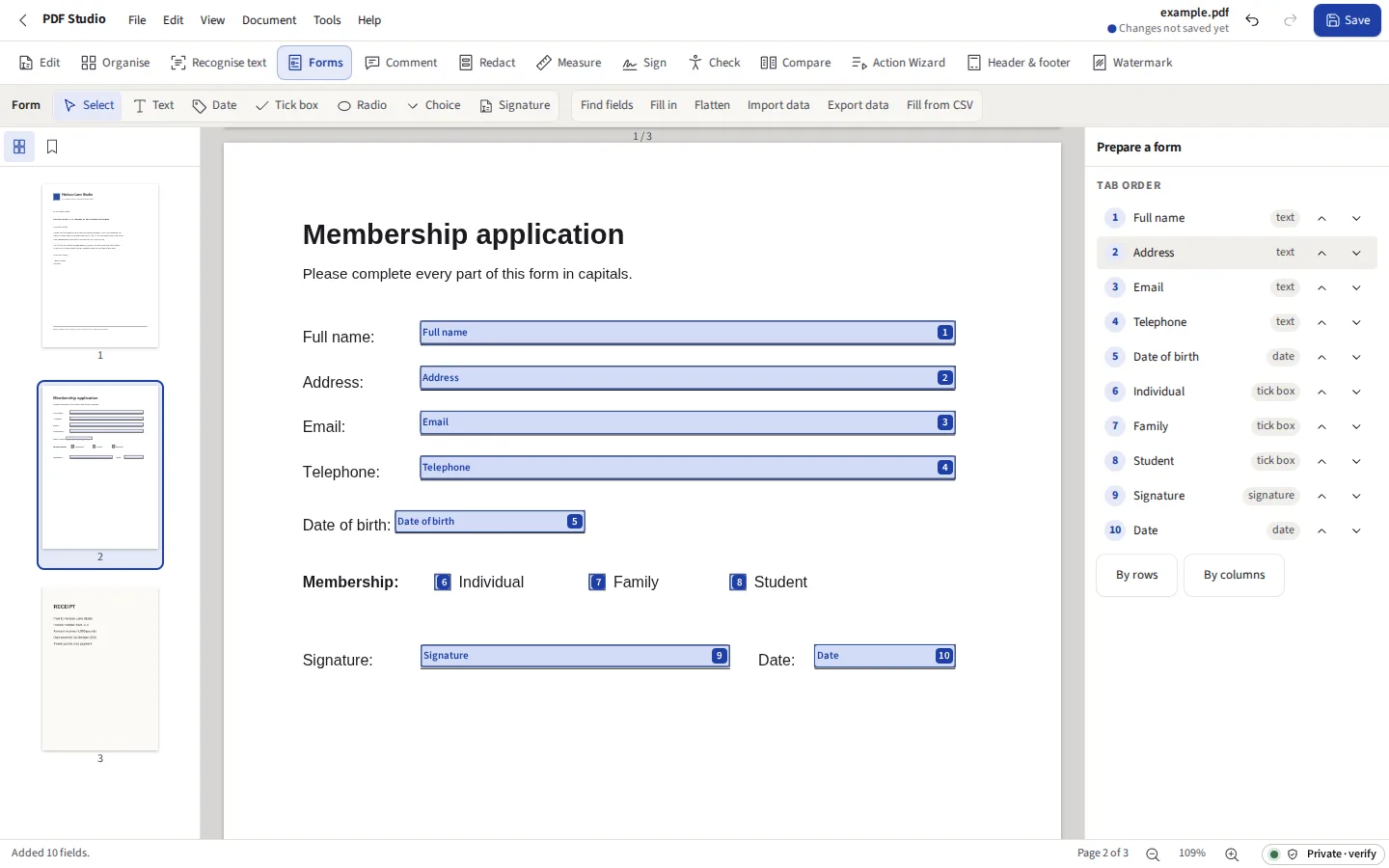



Change the words already printed in a PDF, in their own font; redact for good; sign with your certificate. The files stay on your computer. Turn a scan into text you can search; build a form and fill it from a spreadsheet; review, measure, compare, check for accessibility, and save as Word, Excel or PowerPoint.
Before you start: Letters drawn as outlines or as a picture are not text: they can be recognised for search, not edited. What else it does not do
Compared with Adobe Acrobat, Smallpdf and iLovePDF.
The page is read operator by operator, the way a reader draws it, and its letters are gathered into lines and paragraphs. Click one to select it, type to change it. The old letters are taken out of the page’s own instructions and the new ones written where they stood, in the same font under the same name when that font has every letter typed; the colour, the spacing and any rotation are kept. Change the size or the colour, move it, or delete it. A paragraph that grows pushes the text below it down, or flows on into the paragraphs after it in its column and onto the next page, each keeping its place. Add a paragraph by dragging a box: it wraps, aligns, justifies or makes a list, and can be edited afterwards. Spelling is checked as you type, in British or American English, and F7 checks the whole document.
A paragraph is rewritten as the words it holds, not as lines: type into the middle and the words after flow on across its lines, wrapped to its width. A bold, italic or coloured word keeps its own font and colour, and words typed next to it take the style of the words they replace. A justified paragraph is found by the gaps between its words and written justified again, each line but the last to the full width; left, centred and right are kept too, and can be changed.
A font embedded in a PDF usually holds only the letters the document used. Type one it does not have and the paragraph is written in the closest standard font (Helvetica, Times or Courier, bold or italic to match), or in DejaVu Sans for letters no standard font has, and the panel says which letter made that necessary.
Every picture on the page can be selected, dragged, resized from its corner, replaced with another (placed in the same box) or deleted. New pictures, rectangles, ellipses, lines and arrows are drawn where you drag, and stay editable; links go to a web address or to a page of the document.
Tesseract, compiled to WebAssembly, reads each page in its own worker, in English, French, German, Spanish, Italian, Portuguese, Dutch, Polish, Russian, Ukrainian, Turkish, Swedish, Danish, Norwegian, Finnish, Czech, Arabic, Japanese or simplified Chinese. The engine and the language file are fetched from this site the first time and kept for offline use. Pages that already have text can be skipped, and a run can be stopped at any page.
Ask, and each page is straightened, despeckled and made black and white against its own background before it is read: the tilt is found by projecting the ink at every angle up to 15 degrees and keeping the one whose lines are sharpest, flecks smaller than a full stop are taken out, and each pixel is judged against those around it, so a shadow across a phone photograph does not swallow the words. The words are laid back over the scan as it is; the picture of the page is not changed. The panel shows a page before and after. On the test page the checks use, tilted four degrees, flecked and shaded, Tesseract read 61% of the words right as it was and 100% cleaned.
Text, date, tick box, radio, choice and signature fields. Each can be required or read only; a text field can be multiline, limited in length, or formatted as a number, money with its symbol before or after, a percentage, a date, or a US ZIP code, telephone or Social Security number, written as the format scripts Acrobat writes. A field can be the sum, product, average, smallest or largest of others, so an invoice adds itself up as it is filled here and in Acrobat; the order fields are worked out in is written into the form. Set the tab order by rows, by columns or by hand. Fill it in on the page, then flatten it so the answers are part of the page.
The answers go out and come back as FDF, XFDF, JSON or CSV. A CSV with a column for each field fills the form once for every row, and each filled copy, flattened if you like and named from a column, goes into one zip.
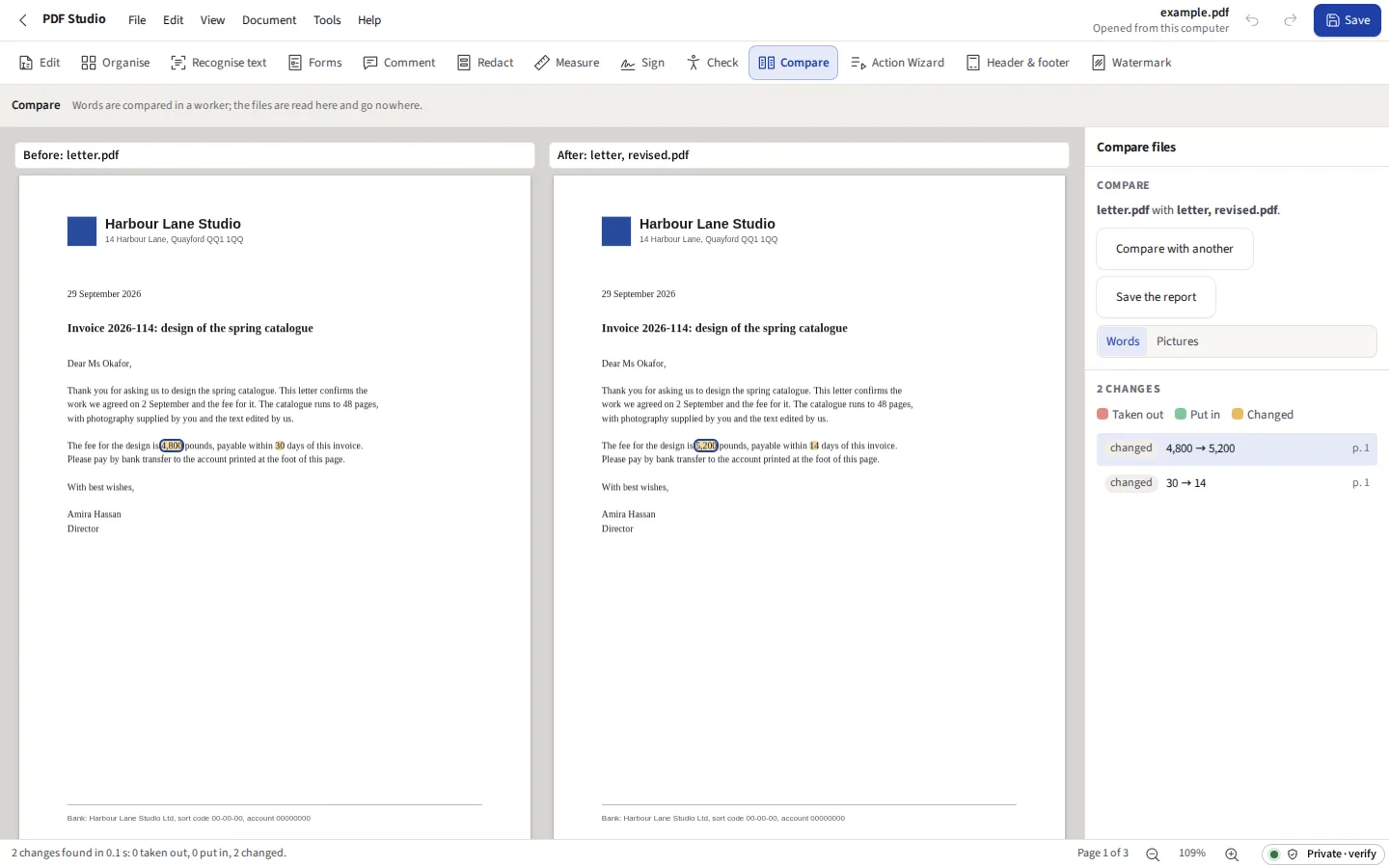
Two PDFs, their words compared in reading order across the whole document. Taken out, put in and changed words are marked on both, side by side, with a list to step through. The picture mode draws each pair of pages over each other and colours what differs. Differences of capitals, of punctuation, or in each page’s header and footer, where the page number and date change, can be left out. The report is a PDF listing every change with its page, and the later file can be saved with each change on it as a comment, a highlight over what was put in or changed with what it was before, so it reads in any PDF reader.
Page thumbnails to drag into order, to turn, delete and extract. Pages from another PDF go in before or after any page, or replace a range of pages, keeping the links, bookmarks and comments that point at them. A file splits every few pages, at each top-level bookmark, or into parts under a size you give, and several files combine into one. Bookmarks are added, renamed, nested and pointed at a page, and page labels (i, ii, iii, then 1, 2, 3) set by range.
A table of where the bytes in a file go, by pictures, fonts, page content, form fields, comments, attached files and document details, and its largest pictures with the pixels an inch each is shown at. Then choose a target (300 pixels an inch for print, 150 for reading on screen, 96 for the smallest file) and the pictures over it are brought down to it, with the document’s details and attached files taken out if you tick them; the table is shown again beside the one before.
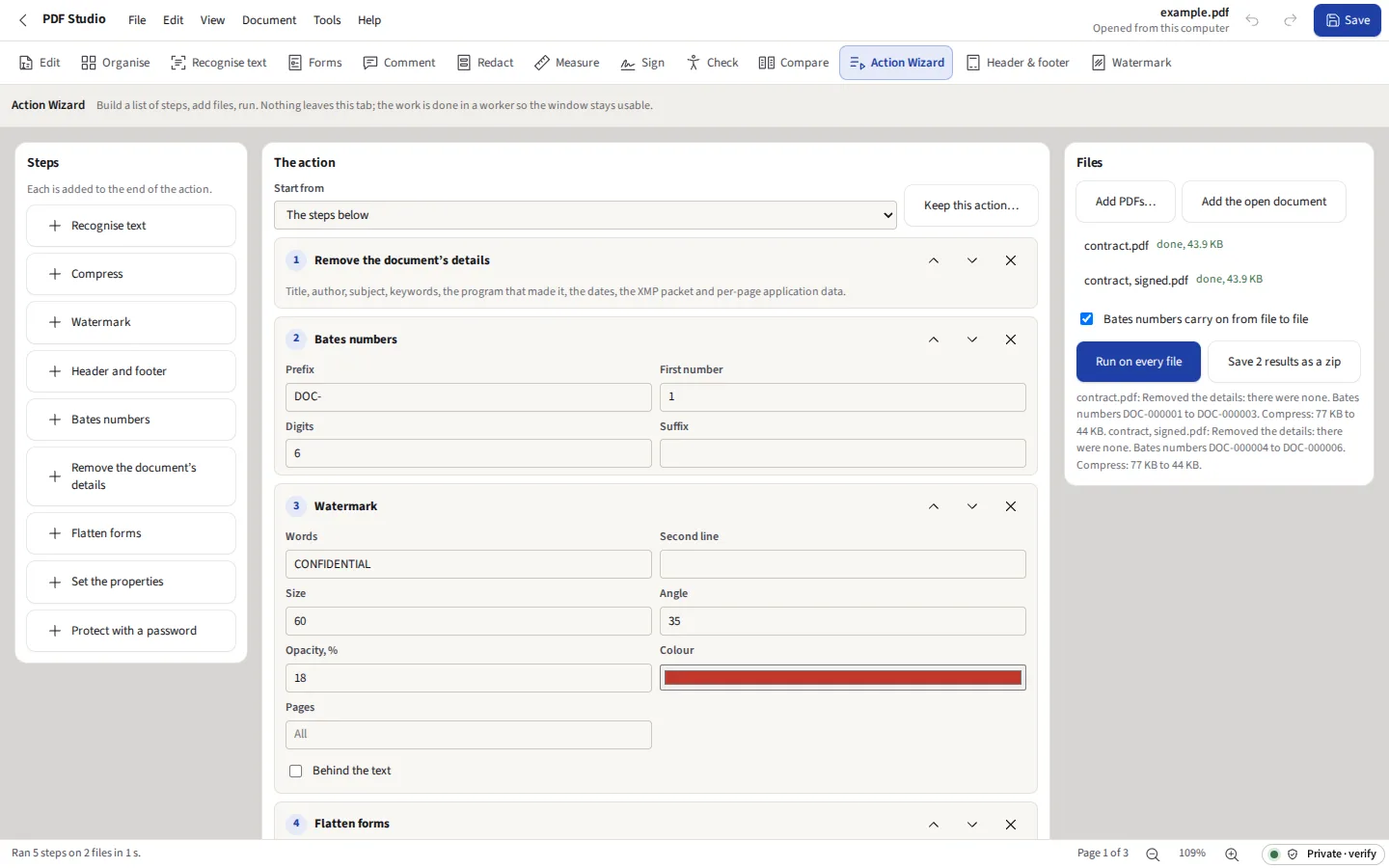
Build a list of steps once, keep it, and run it on as many files as you drop in: recognise text, compress, watermark, header and footer, Bates numbers, remove the document’s details, flatten, set its properties, and protect it with a password. The compression, watermark and password are the same code as the site’s own PRESS, WATERMARK and PADLOCK.
Marks first, redaction second. A search marks each match of the patterns you tick (checked where they carry a check digit, as card numbers and IBANs do), of your words and of your own expression, invisible text included; a drag marks an area; any mark can be left out. Email addresses, card numbers, IBANs and Social Security and National Insurance numbers are found by the same rules as the site’s SENTINEL, and telephone numbers by DATASCAN’s detector, so the site judges them alike everywhere. The same search runs over a batch of files, each match listed to tick or untick; every file is redacted as a copy, opened again from what was saved and searched again, and the copies are saved in one zip. Redact takes out every letter under a mark from the page’s own instructions, cuts the lines and shapes there, paints the pixels of a picture under it in the picture itself (a fax or JBIG2 scan too, which stays a scan with its recognised text), and removes the links, notes and form fields there. So that a gap does not give away how long the words were, each one is given a width of its own, chosen at random, and the rest of the line moves up to it; the box drawn is that width. Bookmarks that name what you searched for are renamed, the document’s details can go too, and the search is run again to show nothing is left. Each mark carries a reason, a code from the Freedom of Information Acts of the UK, the US or Canada, from data subject access or from disclosure, or words of your own, which can be printed in its box; every area redacted goes into a log of page, reason and grounds, saved as CSV or PDF, with the words taken out only if you ask. Marks can also be saved in the file unapplied, as the Redact annotations Acrobat uses, for someone else to check; a file marked that way, here or in Acrobat, opens with them as marks.
Every kind of comment a reader shows, each with its author, date and colour and an appearance of its own, so it looks the same in any reader. Replies and review statuses (accepted, rejected, cancelled, completed) are written as the standard has them. The review summary is a PDF listing each comment by page with the words it marks, its thread and its status. Flattening draws the comments into the pages.
The comments save as XFDF, the file Acrobat and most readers exchange comments in. Each reviewer comments on their own copy and sends back theirs; merge as many as you like. Each comment keeps its author and dates, a reply lands on the comment it answers, a comment already here is left alone, and one that two people changed is shown in every version, with whose file each came from, for you to choose. A comment the reviewer deleted is deleted here too, when their file was saved from PDF Studio. Files written by Acrobat are read too.
Open your PKCS #12 certificate file with its password, or make a certificate here. The signature is a CMS detached signature over every byte of the file but itself, the kind Acrobat and every other checking reader verify, added after the file as it was, so a second signature leaves the first intact. Tick Add a trusted timestamp and the SHA-256 hash of the signature, and nothing else, goes through this site to a free public time-stamping authority (DigiCert, or Sectigo when it does not answer), whose signed token is kept in the signature (PAdES-B-T); a document timestamp over the whole file can follow it. Every signature in a file is checked here: whether the file has changed since, whether the signature matches its certificate, who the certificate names, and for a timestamp, its time, its authority and whether it matches.
Import the certificates you trust, an organisation’s root or a colleague’s own, from .cer, .crt, .pem, .der, .p7b or .p7c files, and every signature is checked against them: its chain is built to a trusted certificate and each link’s signature verified, each certificate’s dates checked at the signing time, and any CRL or OCSP response you add believed only if its own signature verifies. A report sets out the chain, the time and where it came from, and what was and was not checked. When signing, Add long-term validation data writes the chain and the revocation responses you supplied into the file’s Document Security Store (PAdES-B-LT), so the signature can be checked years later. A Digital ID, a certificate and key of your own, can be made here and saved as a .p12 file with a password.
Click the ends of a distance, the corners of a perimeter or an area. The scale is a length on the page and what it stands for, set from 1:1, 1:50 or 1:100, typed in, or calibrated by drawing along a line of known length. Each measurement is kept in the file as the standard’s measurement annotation, with its scale, so another reader that measures reads the same value.
The check covers tags, a title shown as the title, the language, real text, letters that map to Unicode, tab order, described fields and links, alternate text, heading levels, contrast on a white page and bookmarks, and says which things need a person. Tagging builds headings, paragraphs, lists, figures, links and fields from the page and marks lines and backgrounds as artefacts; each figure is then described in the panel.
Fonts not embedded, encryption, JavaScript, content fetched from outside the file, device colour without an output intent, missing XMP, comments that will not print, form fields that ask the reader to draw them, attachments, transparency, coarse pictures and a missing identifier. It can embed the fonts, take the scripts out, add an sRGB output intent with a profile made here, write XMP, set comments to print and draw the fields.
Convert to PDF/A-1b, 2b, 2u or 3b, and check the file against the rules of ISO 19005 that can be decided by reading it, each named by its clause. Fonts that are not embedded are embedded, with a free font of the same measures where the document named a standard one; CMYK colour becomes RGB to match an sRGB intent; scripts, LZW and interpolation go; comments are set to print. The file says it is PDF/A only when every rule passes.
The tag tree: retag, describe, move, wrap and take away elements, and change the role map. The reading order of each page, numbered where the content is, changed by dragging, or put top to bottom or down each column. Tables are tagged as tables, a row drawn as one line of text split into its cells. The PDF/UA check names each condition of ISO 14289-1 a program can decide, and lists those for a person.
Word gets the headings, paragraphs, lists and pictures in reading order, written by the same Word writer Docs uses. Excel gets a sheet for each page with its lines split into columns where the words line up, and figures such as £1,250.00 and 12% as numbers. PowerPoint gets a slide for each page, as a picture of it or as text boxes and pictures where they were. Each export says before it starts what comes across and what does not.
The file is read for everything it holds besides what its pages show, and each kind is counted: the document’s details, its XMP and the identifier that ties copies together, scripts and actions, attached files, layers, the camera and the place inside a JPEG’s Exif, thumbnails, web links, comments, invisible text, text drawn but not seen (white on white, or under a shape), and what lies outside a page’s crop box. What is ticked is taken out; a layer that was switched off goes from the page’s own instructions, so the page draws as it did. The file is then read again, to show none of it is left. Earlier versions kept inside a file are never written into a copy saved here.
Crop from margins typed, dragged on the page, or found from the white round the ink, for one page, a range, or each page to its own margins; the top is the top as you read it, on a turned page too. A page can be made A3 to Tabloid or any size, its contents scaled to fit or kept at their size and centred, and its comments, links and bookmarks move with them.
Ctrl+F looks through the words on every page, marks each match and steps through them, matching case or whole words if asked, and looks again after a change.
Pages save as PNG or JPEG at 72 to 600 pixels an inch, the resolution written into each so it prints at the page’s size. Pictures become a PDF, one a page: a JPEG goes in as it is, without being compressed again, and stands the way the camera held it. Printing sends each page on a sheet of its own size as its own text and drawings, in the fonts the PDF carries, so it is as sharp as the printer can make it.
The files a PDF carries, listed with their size, date and description, to save, remove or add to.
A matter’s bundles, redacted productions and drafts kept in the matter’s one encrypted file from Practice: File, Add to the matter file puts the document on screen in it, and The matter’s files opens one again. Practice’s, Case’s and Books’ parts stay sealed. How it works
A plug-in is a short JavaScript file that reads the document and asks for stamps, notes, highlights, bookmarks, properties, filled fields or a file of its own. It runs in a worker that can reach no address, this site included, and no storage, and is stopped after ten seconds; each thing it asks for is checked before it is done, and a run is one step of Undo. Four examples come with it to read and change.
Text in any of six places, with the page number, the page count, the date, the file’s name and a Bates number of a prefix and as many digits as you want. The page you are on shows the result before anything is written. On a page that is turned, the footer runs along the edge that is at the bottom when it is read. A set of files is numbered as a production is: in the order you give, each going on from the last, each named by its range if you like, with an index of the set as CSV and as a PDF.
Said now, so that nobody pays to find out.
Drop a PDF here, or pictures to make one, or choose a file. It is read in this tab and stays on this computer.