Content calendar template
Everything planned to go out, when, where and by whom, with a count of how much is still an idea.
Open in SheetsFree, with no account. What you type stays in this browser. Saves as Excel, OpenDocument or CSV.
What is in it
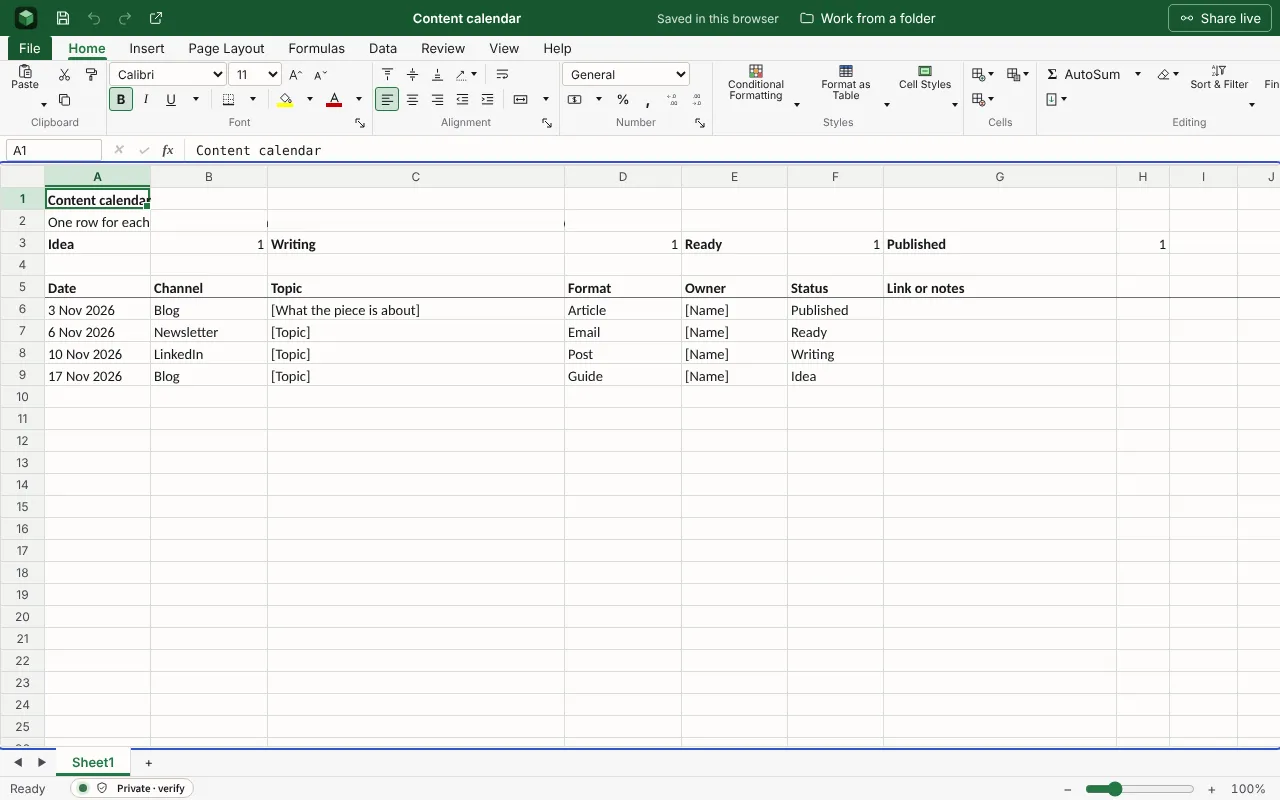
One row for each post, article or newsletter, with its date, channel, owner and status, and a count of how many are at each stage. The figures are examples to type over.
| Content calendar | |||||||
| One row for each piece. Status is Idea, Writing, Ready or Published, and the counts below follow it. | |||||||
| Idea | =COUNTIF(F6:F80,"Idea") | Writing | =COUNTIF(F6:F80,"Writing") | Ready | =COUNTIF(F6:F80,"Ready") | Published | =COUNTIF(F6:F80,"Published") |
| Date | Channel | Topic | Format | Owner | Status | Link or notes | |
| 2026-11-03 | Blog | [What the piece is about] | Article | [Name] | Published | ||
| 2026-11-06 | Newsletter | [Topic] | [Name] | Ready | |||
| 2026-11-10 | [Topic] | Post | [Name] | Writing | |||
| 2026-11-17 | Blog | [Topic] | Guide | [Name] | Idea | ||
Worked out for you
These cells are formulas, so they follow whatever you type. Each is shown as written in its first row.
- Idea
=COUNTIF(F6:F80,"Idea")
Filling it in
- Give every piece one owner and a date, even if the date moves.
- Keep ideas in the same list with the status Idea. A calendar with nothing waiting runs dry.
- Sort by date before each weekly meeting and talk only about the next two weeks.
More templates
- Sales pipelineEach deal with its company, stage, value and expected close, the chance of winning it from its stage, and the pipeline’s weighted total.Open in Sheets
- Project status reportWhere the project stands and why, in a line, then what was done, what is next, and what you need from the reader.Open in Docs
- Press releaseThe story in the first 40 words, then detail, a quotation and Ends, with notes to editors and a contact below.Open in Docs