Cash-flow forecast template
Six months of money in and out, each month opening on the last one’s closing balance, and the tightest month picked out.
Open in SheetsFree, with no account. What you type stays in this browser. Saves as Excel, OpenDocument or CSV.
What is in it
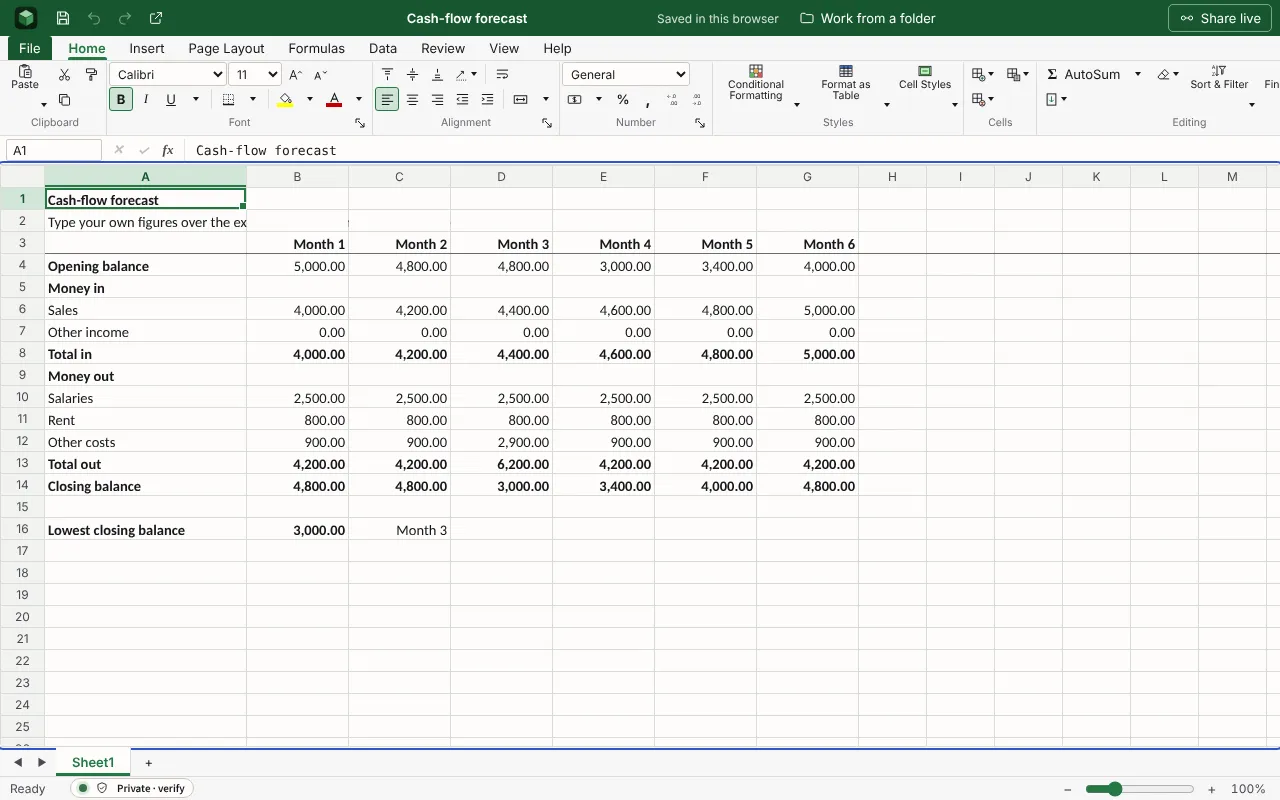
Six months of money in and out, each month opening where the last one closed, and the lowest balance picked out. The figures are examples to type over.
| Cash-flow forecast | ||||||
| Type your own figures over the examples. Each month opens with the balance the month before closed on. | ||||||
| Month 1 | Month 2 | Month 3 | Month 4 | Month 5 | Month 6 | |
| Opening balance | 5000 | =B14 | =C14 | =D14 | =E14 | =F14 |
| Money in | ||||||
| Sales | 4000 | 4200 | 4400 | 4600 | 4800 | 5000 |
| Other income | 0 | 0 | 0 | 0 | 0 | 0 |
| Total in | =SUM(B6:B7) | =SUM(C6:C7) | =SUM(D6:D7) | =SUM(E6:E7) | =SUM(F6:F7) | =SUM(G6:G7) |
| Money out | ||||||
| Salaries | 2500 | 2500 | 2500 | 2500 | 2500 | 2500 |
| Rent | 800 | 800 | 800 | 800 | 800 | 800 |
| Other costs | 900 | 900 | 2900 | 900 | 900 | 900 |
| Total out | =SUM(B10:B12) | =SUM(C10:C12) | =SUM(D10:D12) | =SUM(E10:E12) | =SUM(F10:F12) | =SUM(G10:G12) |
| Closing balance | =B4+B8-B13 | =C4+C8-C13 | =D4+D8-D13 | =E4+E8-E13 | =F4+F8-F13 | =G4+G8-G13 |
| Lowest closing balance | =MIN(B14:G14) | =INDEX(B3:G3,MATCH(B16,B14:G14,0)) | ||||
Worked out for you
These cells are formulas, so they follow whatever you type. Each is shown as written in its first row.
- Opening balance: Month 2
=B14- Opening balance: Month 3
=C14- Opening balance: Month 4
=D14- Opening balance: Month 5
=E14- Opening balance: Month 6
=F14- Total in: Month 1
=SUM(B6:B7)- Total in: Month 2
=SUM(C6:C7)- Total in: Month 3
=SUM(D6:D7)- Total in: Month 4
=SUM(E6:E7)- Total in: Month 5
=SUM(F6:F7)- Total in: Month 6
=SUM(G6:G7)- Total out: Month 1
=SUM(B10:B12)
Filling it in
- Put money in the month it actually arrives, not the month you invoice it. If customers pay in 30 days, a sale in March is cash in April.
- The lowest closing balance is the figure to watch. If it goes below nought, that is the month to arrange an overdraft, not the month you need it.
- Replace each month’s forecast with the actual figures once it is over, and the next months become more accurate.
The next step
More templates
- Operating budgetBudget against actual for each category, with the variance and the totals worked out.Open in Sheets
- Invoice trackerInvoices, clients, amounts and whether each is paid, with the total invoiced.Open in Sheets
- Business planEleven sections in the order a bank or an investor reads them, each with what it has to answer.Open in Docs